Your medical exams tell the story of your health, but that story is probably scattered across email attachments, WhatsApp messages, and forgotten folders. JanusMed's Exam Tracking feature brings everything together in one searchable, organized place — and automatically extracts the numbers that matter.
Upload Any Medical Document
JanusMed accepts PDFs and images of virtually any medical document: blood tests, imaging reports (X-rays, MRIs, ultrasounds), pathology results, doctor's notes, and hospital discharge summaries. Whether it's a crisp PDF from a modern lab or a photo of an old paper report, our system handles it. You can upload documents from your phone's camera, photo library, or files app — whatever is most convenient.
Exams List
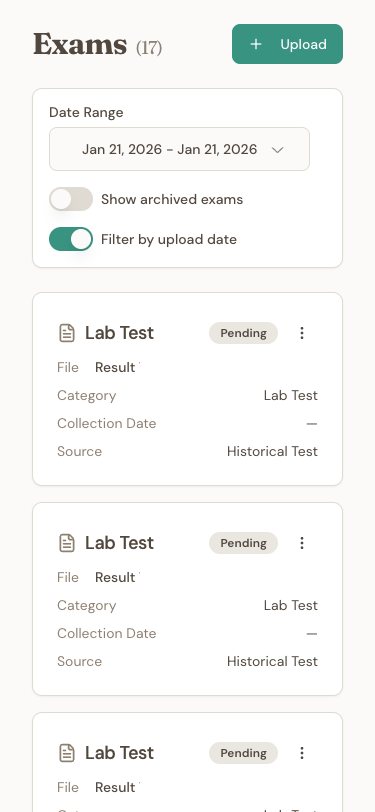
View all your exams with filters by date, processing status, and archiving options.
Automatic Metric Extraction
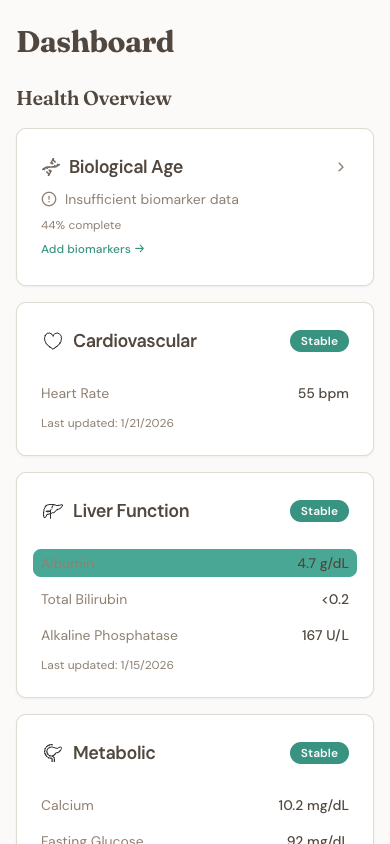
This is where the magic happens. When you upload a lab result, JanusMed's AI analyzes the document and automatically extracts health metrics like glucose, cholesterol, hemoglobin, and hundreds of other values. Each extracted metric includes the numeric value and unit, the lab's reference range, the collection date, and a link back to the original document. No manual data entry required. The extracted values appear on your health dashboard within seconds.
Metrics Dashboard
Extracted metrics are organized in groups like Cholesterol, Blood Sugar, Kidney Function, and more. View all your health metrics in one place.
Trend Graph
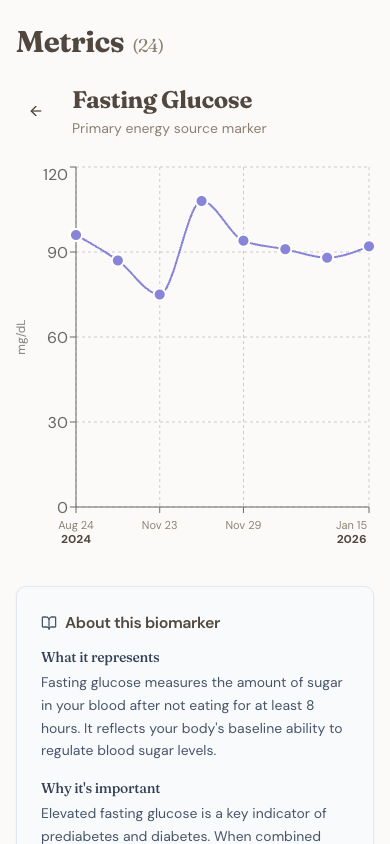
Visualize how each metric evolves over time. Explanatory text helps you understand what each test measures and its impact on your health.
Intelligent Processing Status
After uploading, exams go through three stages: pending (queued for processing), processing (AI is analyzing the document), and processed (metrics extracted and ready). You'll see a notification when processing completes. If an exam contains no extractable metrics — like an imaging report that's purely descriptive — it's still stored and searchable, just without numeric data.
Metric Details
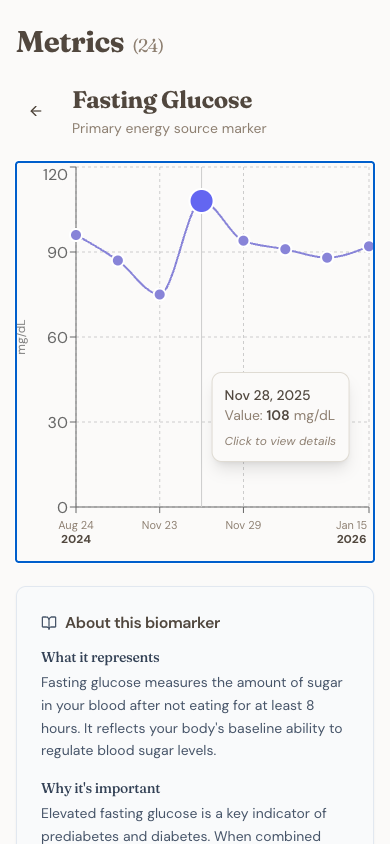
Tap any point in the chart to see details: date, value, and link to view more information about the metric.
Powerful Full-Text Search
Every document you upload becomes fully searchable. Looking for that MRI report from 2022? Type 'MRI' and it appears instantly. Trying to find when your vitamin D was last tested? Search 'vitamin D' and see every document that mentions it. The search works across all your exams simultaneously, finding results in seconds rather than the hours it would take to dig through email attachments.
Smart Filtering and Organization
Filter your exams by date range — either by when you uploaded them or when the samples were collected. This is useful when you want to see 'all exams from last year' versus 'everything I uploaded this month.' You can also toggle archived exams on or off to keep your view clean while preserving old documents.
Built-in Document Viewer
View any exam directly within JanusMed — no need to download files or switch apps. The built-in viewer supports multi-page PDFs with page navigation, pinch-to-zoom for examining fine details, and highlights showing where extracted metrics were found. Search within a document to jump directly to specific terms.
Archive Old Exams
As your collection grows, you might want to declutter without deleting. Archiving hides exams from your main view but preserves them and their extracted metrics. Archived exams can be restored anytime, and you can choose to include them in searches when needed.
Multi-Profile Support
Managing health records for your family? Each profile keeps its exams completely separate. Upload to your parent's profile without mixing their results with yours. Switch between profiles with a single tap to see each person's complete history.
Pro Tips
- Upload older exams too — the more history JanusMed has, the better it can show trends over time
- Take photos in good lighting to improve extraction accuracy for paper documents
- Use descriptive search terms like the test name, doctor's name, or lab facility
- Check the Metrics dashboard after uploading to confirm values were extracted correctly
Get started for free — upload up to 50 exams at no cost.