We're excited to introduce the Health Summary PDF Export feature. Now you can generate a beautifully designed, one-page summary of your most important health data — perfect for doctor appointments, sharing with family, or keeping in your travel documents.
The Problem We Solved
Preparing for a doctor's appointment often means scrambling to remember test results, medication names, and symptom patterns. Sharing health updates with family members usually involves lengthy explanations or sending multiple screenshots. And traveling with your medical history meant carrying stacks of papers. The Health Summary PDF changes all of that.
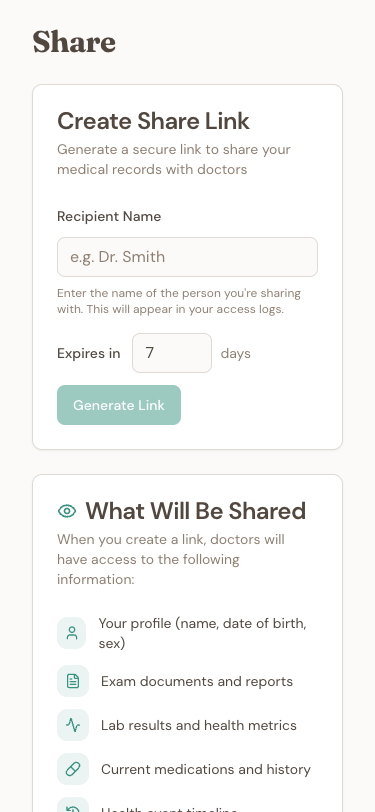
Create Share Link
Generate secure links to share your medical records with healthcare providers.
Most Recent Lab Results
Your latest test results are displayed in an easy-to-scan grid format. Each metric shows the current value with unit, reference range for context, color-coded status (green for normal, amber for borderline, red for out of range), and trend arrows showing if values are improving or worsening compared to your previous test. The system automatically prioritizes abnormal values so they're never hidden.
Historical Trends
See how your key health metrics have changed over the past year. A compact table shows up to three data points per metric, along with the overall trend direction and percentage change. It's the easiest way to visualize whether your treatment plan is working.
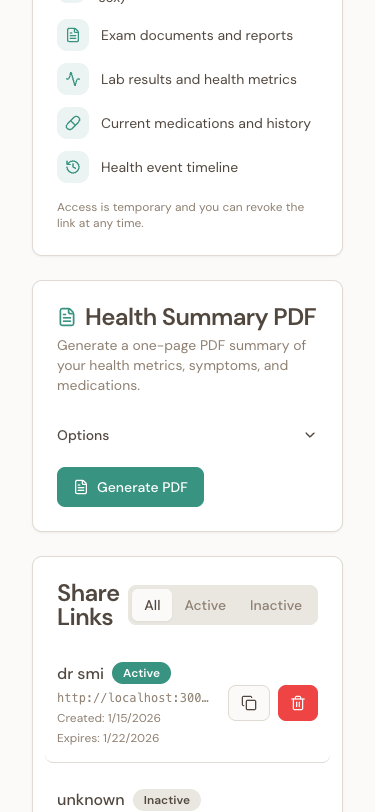
Health Summary PDF
Generate a one-page PDF with your metrics, symptoms, and medications for doctor visits.
Symptoms & Medications
Track your most frequently reported symptoms from the last 30 days, including average severity scores. The summary also highlights any new symptoms that appeared recently. Your active medications are listed with dosage and frequency, plus your overall medication adherence score displayed as a visual progress bar.
Designed for Real-World Use
The PDF fits on one page with no scrolling. It's print-ready in A4 format with proper margins, has a professional design suitable for clinical settings, and is available in English and Portuguese. The font size automatically adjusts based on how much data you have.
How to Use It
Navigate to the Share screen in your JanusMed app, find the "Health Summary PDF" card, optionally customize to include or exclude symptoms and medications, tap "Generate PDF" — it's ready in under 3 seconds, then download, print, or share directly via email or messaging apps.
Perfect For
- Doctor appointments: Give your physician a quick overview instead of spending valuable consultation time reviewing history
- Second opinions: Share your complete health picture with a specialist
- Family caregivers: Keep siblings updated on an aging parent's health status
- Travel: Carry a portable summary of medications and conditions
- Personal records: Maintain an archive of your health journey
Privacy & Security
Your health data is sensitive, and we treat it that way. PDFs are generated on our secure servers, stored with encryption, and download links expire after 24 hours. Each PDF includes a unique export ID for traceability.
Open your JanusMed app and head to the Share screen to get started.